TLDR
If you just want to copy my setup, here are the important pieces.
My FSRS Parameters (Paste into Anki Settings)
Paste these into Anki’s FSRS parameters:
0.1063, 0.5836, 1.9060, 11.9653, 5.5088, 0.8532, 3.0580, 0.0010, 1.4459, 0.1734, 1.0269, 1.2071, 0.0064, 0.4765, 2.0159, 0.2124, 2.7237, 1.0038, 0.0241, 0.3145, 0.3633
These are the parameters I personally use. Don’t blindly assume they are optimal for everyone; FSRS works best when you have enough review history to optimize it to your own cards and reviewing habits. However, it can be helpful to start from another med student’s settings.
I use an 8BitDo Micro as my Anki remote through the Contanki addon. My configuration is available here:
8BitDo_Micro.contankiAnki Addon Codes
These are the addons currently in my setup:
1466251171 - Addons Code Exporter Fixed Backup
874215009 - Advanced Browser
1044112126 - AMBOSS Official  Medical School Step  Shelf Study Resource
175794613 - Anki Leaderboard - Compete with friends to boost motivation Custom by Shige
1138356489 - Anki Wrapped
933207442 - AnkiCord - Discord Rich Presence Customized by Shige
1322529746 - AnkiHub
1165281739 - AnkiLock
952691989 - AnKing Note Types Easy Customization
1621009815 - AnKing QuickSearch
204584680 - Anking Yield Tags on Review
561924305 - Batch Download Pictures From Google Images
1052724801 - BetterSearch
2494384865 - Button Colours Good Again
1084228676 - Color Confirmation
594329229 - Colorful Tags  Hierarchical Tags
1898790263 - Contanki - Controller Support for Anki beta
255048658 - Duolingo-style gamification -- visual audio and haptic feedback
1990296174 - Enhanced Cloze for Anki 21
1939527074 - Find cards from UWorld test Updated
759844606 - FSRS Helper Postpone  Advance  Load Balance  Easy Days  Disperse Siblings
225180905 - Highlight Search Results in the Browser
1545338943 - History Visualizer
1374772155 - Image Occlusion Enhanced
867316254 - Minimal Theme
1063901297 - Modern Stats Dashboard
738807903 - More Overview Stats 21
1263172192 - MultiDeckImporter
1882716549 - Progress bar Actual Minimal
1362209126 - Quizlet to Anki 21 Importer with audio support
1771074083 - Review Heatmap
1613056169 - Search Stats Extended
1906641654 - See Previous Card Ratings in Reviewer
236979321 - SynapsePro - The Ultimate Anki Workspace
1489494509 - Toggle Remaining Card Count Visibility
94685914 - Transfer scheduling data from one card to another
271205340 - UWorld2Anki
Introduction
The AnKing and countless other YouTubers and students have already made extensive posts and videos on how they use Anki. This is not meant to be another one of those guides.
I keep getting asked about my Anki settings, addons, and setup, so I figured I would put everything in one place. This is simply the setup I currently use, so feel free to copy whatever you find useful and ignore the rest.
The Anki Manual has detailed explanations of essentially every setting, so I won’t repeat everything here; explore the manual if you want to understand what each setting does.
Deck Settings
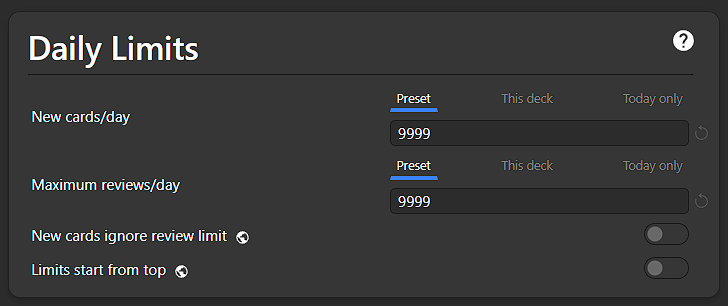
I recommend setting the display order to 9999 for new cards and max reviews, as the goal should be to finish all your reviews every day. I would set the new cards/day limit to a specific number if I wanted to unsuspend a large batch of cards at once but spread them out over a set period of time.
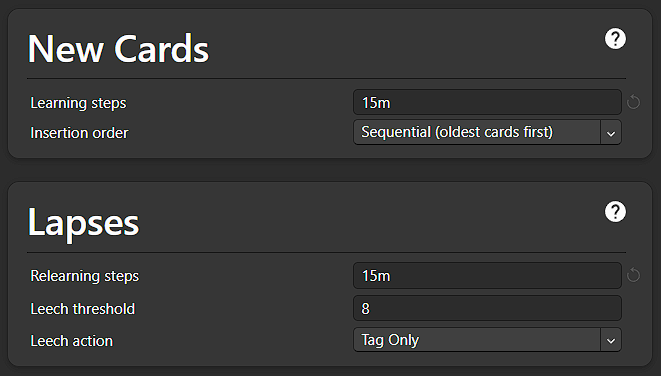
I use 15m for both learning and relearning steps. For me, that is enough time between getting a card wrong and seeing it again to make sure I have to actively recall it, rather than simply recognizing something I saw a minute ago. You could use a longer interval, such as 30m, if you prefer.
Also, set your Learn Ahead limit to a few minutes longer than your learning step (mine is 20 minutes). This way, when you only have “orange” learning cards left, you don’t have to sit around waiting for the next card to become available just to finish your reviews.
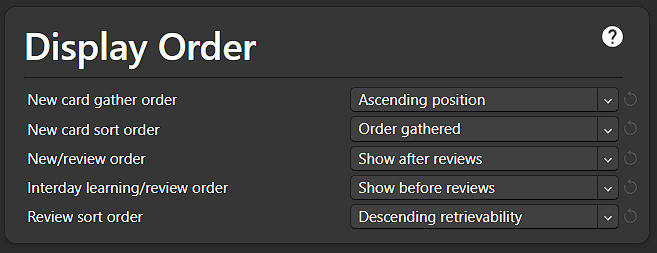
For display order, I like to do new cards after reviews, so I have Show after reviews selected. I also like to get my learning cards done before reviews, so I use Show before reviews. For the review sort order, I use Descending retrievability. This has the most evidence supporting it, and I find that it also helps me get through my reviews more quickly.
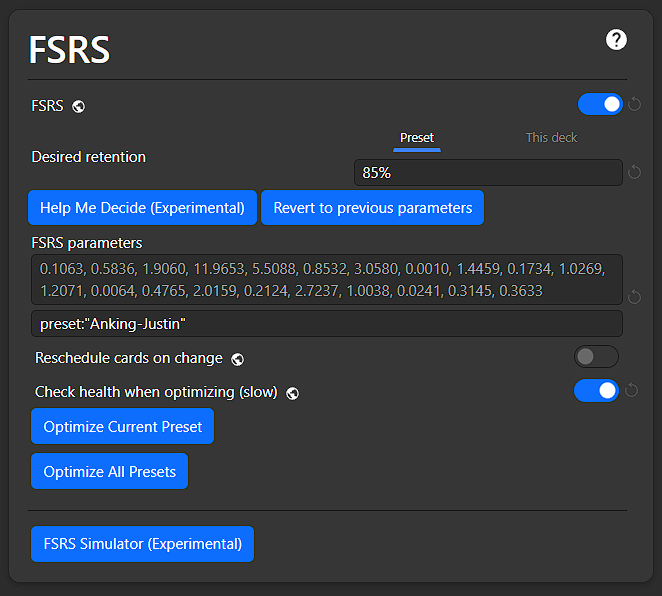
USE FSRS. For a medical student doing a large number of reviews, this is one of the biggest improvements you can make to your scheduling.
My FSRS parameters are in the TL;DR. You can use them until you’ve built up enough review history to optimize FSRS to your own learning. I recommend starting at 90% desired retention and gradually lower it if the review burden gets too high, down to a minimum of 85%. I had to do this during Micro II when my review load became too much.
In the box below the parameters, make sure it only says preset:"YOURPRESETNAME"; do not include -is:suspended. This ensures suspended cards’ review history is still used when optimizing. My preset is called Anking-Justin, which is why that’s shown in the screenshot.
Optional Settings
Burying: Enable all burying options. This prevents closely related cards from appearing together and reduces the chance of getting hints from sibling cards.
Easy Days: Optional. I don’t personally use Easy Days, but they can be useful if you know that certain days will be busier. For example, you could reduce your workload on weekends, exam days, long clinical days, and travel days.
Advanced: For the Advanced settings, I recommend mostly leaving things at their defaults. In particular, make sure your maximum interval remains at its default of 36500 days unless you have a specific reason to change it.
Addons
I won’t highlight all of them due to space, but they are all great! The codes for the addons I use are available in the TL;DR.
AMBOSS: Adds AMBOSS integration directly into Anki, making it easy to look up concepts and connect your cards with relevant AMBOSS resources.
AnkiHub: Lets you subscribe to and collaborate on shared Anki decks, including the AnKing Step Deck (requires subscription).
AnkiLock: iOS app which uses the Screen Time feature to lock certain apps and websites until after you’ve finished your reviews.
Contanki: Lets you use almost any game controller to navigate and review cards in Anki.
Find Cards from UWorld Test - Updated: Finds relevant Anki cards based on questions you encounter in UWorld.
FSRS Helper: Adds useful tools and features for getting more out of the FSRS scheduling algorithm, including rescheduling and optimization tools.
Modern Stats Dashboard: Gives Anki’s front page statistics a more modern interface and makes it easier to visualize your cards remaining.
Progress Bar - Actual Minimal: Adds a clean, minimal progress bar to the reviewer so you can see how far along you are in a study session.
Review Heatmap: Gives you a visual calendar showing your review activity, making it easy to see your study streaks and consistency over time.
See Previous Card Ratings in Reviewer: Shows your previous ratings for a card while reviewing, giving you more context when deciding how to rate it this time.
8BitDo Micro (Anki Remote) Settings
If you like using a remote to control Anki, the 8BitDo Micro is a small, inexpensive option that works really well with Contanki. I use it to make card reviews a little more comfortable, especially during longer study sessions.
I’ve included my personal button layout below, which you can import directly into Contanki:
8BitDo_Micro.contankiOther Thoughts and Tricks
Here are a few other tips and tricks I’ve picked up that have made using Anki a little easier and more efficient. None of these are essential, but they’ve helped make Anki more manageable for me.
As an aside, I have my next day starting four hours past midnight, so my reviews reset for the next day at 4:00 AM. I like this because I will sometimes do reviews really late at night if I have had a busy day but do not feel like sleeping yet.
FSRS Helper
Anki addon that supports the FSRS algorithm and allows you to do some advanced, but very useful stuff.
I will highlight a few functions I commonly use below and explain how I use them.
Reschedule
I use Reschedule after optimizing my FSRS parameters. If I remember correctly, cards do not get the newest parameters applied until you see them again, so I like to reschedule all of my cards after an optimization. This lets me update my entire collection to the latest parameters without having to wait for each card to come up for review.
Postpone
I use Postpone when I do not think I can finish all of my reviews in a day. It is useful when I want to reduce the immediate workload without necessarily spreading a large backlog across many days.
I also sometimes only postpone the “Safe Amount”, which can reduce the most immediate card load while still keeping the amount being postponed relatively conservative.
Schedule a Break
I use Schedule a Break when I have a massive backlog that I want to distribute over a period of time. Rather than trying to deal with everything at once, it spreads the workload across the following days.
I generally decide between Schedule a Break and Postpone based on what my card load looks like over the next several days. If I just need to make today’s workload more manageable, I will usually use Postpone. If I have a large backlog that needs to be distributed over a longer period, I will use Schedule a Break.
So, in practice, I think of them as:
- Reschedule: Apply my newly optimized FSRS settings across my cards.
- Postpone: Reduce today’s workload when I cannot finish everything.
- Schedule a Break: Spread a large backlog across multiple days.
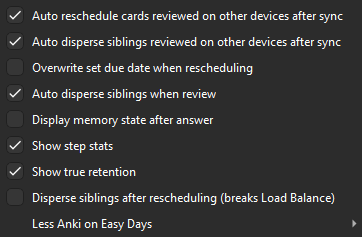
The FSRS Helper settings I currently have enabled.
Filtered Decks
I created a few filtered decks to make it easier to break up reviews from the main Step Deck without having to move cards into separate decks. If you’re new to filtered decks, the Anki documentation has a good overview: https://docs.ankiweb.net/filtered-decks.html
For all of these filtered decks, make sure you select “Reschedule cards based on my answers in this deck.”
AnKing 100
Search: "deck:AnKing Step Deck" is:due
Limit: 100 cards, sorted by Descending retrievability
This pulls the 100 most difficult-to-retrieve review cards from your deck, making it easy to knock out your reviews in smaller chunks.
AnKing New + Learn
For days when you want to get through your new and learning cards first and come back to your reviews later.
is:learn "deck:AnKing Step Deck"Limit: 9999 cards, sorted by Order dueis:new "deck:AnKing Step Deck"Limit: 9999 cards, sorted by Order added
This lets you work through your learning and new cards separately before tackling your review cards.
AnKing Overdue
For days when you have a bunch of overdue cards and want to separate them into their own filtered deck to work through later.
Search: "deck:AnKing Step Deck" is:due prop:due<=-1
Limit: 9999 cards, sorted by Order due / Descending retrievability
This pulls out your overdue cards so you can tackle them separately instead of letting them get mixed in with your regular reviews.
There is no perfect Anki setup. This is simply what has worked for me so far. Use FSRS, stay consistent with reviews, and build a setup that makes studying easier. Take what is useful and adjust the rest to fit your needs.